Development · 15 min read · 2026-10-05
Execute a Trading Signal on Hundreds of MT5 Accounts Safely
By MetaTrader API Engineering Team
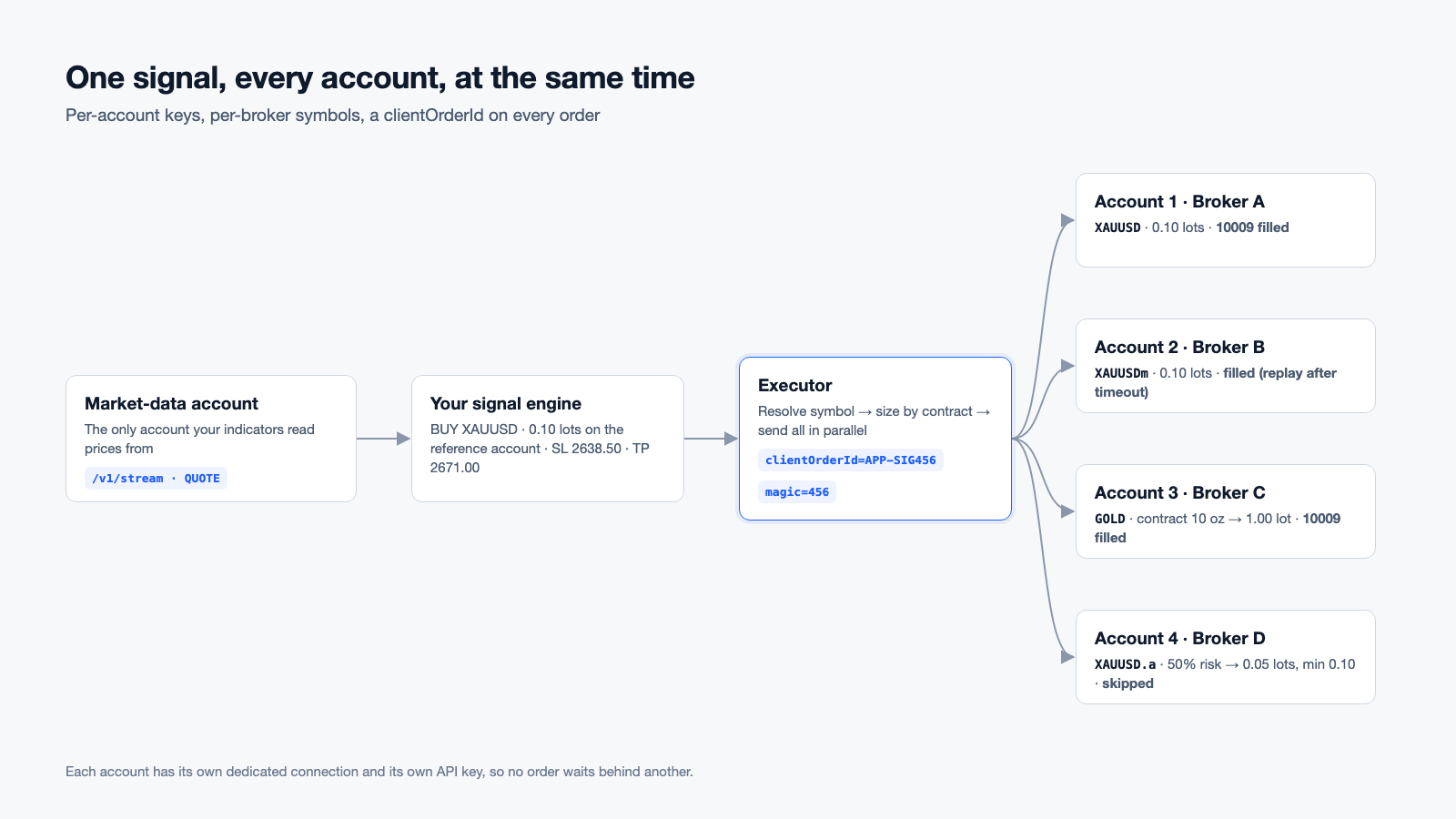
Fan one trading signal out to hundreds of MT5 accounts at different brokers: per-account keys, symbol mapping, lot sizing and retries that never duplicate.
Short answer: connect every client account once, give each account its own API key, resolve the broker's symbol name and lot rules for each account in advance, and then send one OrderSend per account in parallel. Each order carries a clientOrderId, so retrying after a timeout can never open a second position, and a magic number, so you can find the trade later on any broker. With per-account keys there is no shared rate limit to queue behind: 500 accounts means 500 independent requests in flight at the same time.
Release note:
clientOrderId, thestopsLevelandfreezeLevelfields, and theORDERSandHEARTBEATWebSocket events go live on 11 October 2026. Everything else in this guide works today.
This guide walks through that design step by step, with working Python code. It is written for teams building signal services, copy-trading products and multi-account execution backends on MetaTrader 5. It assumes your signals come from somewhere else: a master account, your own model, or a human approving a trade.
What you are building
A signal-execution backend has four parts:
- One market-data account. Your indicators and signal logic read prices from a single account. Client accounts are never asked for candles or ticks, which keeps API traffic per client close to zero between trades.
- A signal engine. Your own code decides: BUY XAUUSD, 0.10 lots on the reference account, stop loss 2638.50, take profit 2671.00.
- An executor. It turns one signal into one correctly-sized order per client account and sends them all at once.
- The client accounts. Each one is connected through MetaTrader API with its own credentials, at its own broker, under its own API key.
Everything below is about part 3, because that is where multi-account systems break: wrong symbol names, wrong lot sizes, duplicate orders after a network error, and orders that wait in a queue while the price moves.
Step 1: connect each account and keep its own key
Connect accounts from your backend when a client signs up. No dashboard is involved:
curl -G "https://hrx.info/ConnectEx" \
  -H "x-api-key: YOUR_TENANT_KEY" \
  --data-urlencode "user=51234567" \
  --data-urlencode "password=CLIENT_MASTER_PASSWORD" \
  --data-urlencode "server=Exness-MT5Real8"
The call waits up to 120 seconds for the connection (set wait= up to 180). In our measurements a connection takes between 25 and 105 seconds, depending on the broker. The response:
{
  "id": "6f1c0e2a-4c1d-4f8e-9a51-0d2e1b7c9f30",
  "status": "ACTIVE",
  "connected": true,
  "statusReason": null,
  "apiKey": "…",
  "apiKeyId": "…",
  "platform": "MT5",
  "brokerServer": "Exness-MT5Real8",
  "note": "Use this id as ?id= and the apiKey as x-api-key on every call."
}
Store id and apiKey against the client. If the wait ends before the account is connected, you get 200 with a status other than ACTIVE; poll /ConnectState?id=… until it changes. If the login fails, the response is 502 with status: "ERROR", and statusReason says why in plain language: wrong password, an investor password where trading needs the master password, a disabled account, or a server that did not answer. Show that sentence to your client; it is written for them.
Why one key per account matters. Rate limits apply per API key: 20 requests per second sustained, with bursts of up to 40. If you send 500 orders through one key, the first 40 are accepted and the rest receive 429 Too Many Requests and must be retried; at 20 per second, the last order goes out about 23 seconds after the first. With one key per account, every account has its own allowance and all 500 orders can leave at the same moment.
Note that the key ConnectEx returns is not locked to its account: it can reach every account in your tenant through ?id=. Treat it as a tenant secret. For execution, create a key that is locked to one account, so a leaked key can only ever affect that one client:
curl -X POST "https://hrx.info/v1/seats/ACCOUNT_ID/keys" \
  -H "Authorization: Bearer YOUR_MANAGEMENT_KEY" \
  -H "content-type: application/json" \
  -d '{"label": "executor", "accountScoped": true}'
The response contains the new apiKey. Add "readOnly": true for keys that should only ever read.
Step 2: resolve the broker's symbol name for every account
The same instrument has different names at different brokers, and sometimes at the same broker on different account types:
| What you mean | Names you will meet |
|---|---|
| Gold vs US dollar | XAUUSD, GOLD, XAUUSD.a, XAUUSD.pro, XAUUSD#, XAUUSD-ECN, XAUUSDm, XAUUSDc |
| Silver | XAGUSD, SILVER, plus the same suffixes |
| Dow Jones index CFD | US30, DJ30, WS30, USA30 |
| Nasdaq 100 index CFD | NAS100, USTEC, US100 |
There is no universal mapping, because brokers name symbols however they like. The reliable approach is to resolve once per account when it connects, cache the result, and refresh it daily:
import re
import httpx

API = "https://hrx.info"

ALIASES = {
    "XAUUSD": ["XAUUSD", "GOLD"],
    "XAGUSD": ["XAGUSD", "SILVER"],
    "US30":   ["US30", "DJ30", "WS30", "DOW30", "USA30"],
    "NAS100": ["NAS100", "USTEC", "US100", "NDX100", "USTECH"],
}
# What may follow the base name: a separator plus a short tag (XAUUSD.a,
# XAUUSD-ECN, GOLD#) or a short lower-case tag (XAUUSDm, XAUUSDc).
# An upper-case letter straight after the base is a different instrument (XAUUSDT).
SUFFIX = re.compile(r"^(?:[._#+\-][A-Za-z0-9]{0,4}|[a-z]{1,3})$")


def candidates(canonical, broker_symbols):
    wanted = ALIASES.get(canonical, [canonical])
    exact = [s for s in broker_symbols if s.upper() in wanted]
    if exact:
        return exact
    out = []
    for s in broker_symbols:
        for base in wanted:
            if s.upper().startswith(base) and SUFFIX.match(s[len(base):]):
                out.append(s)
                break
    return out


def resolve_symbol(client, acct_id, key, canonical, reference_contract):
    h = {"x-api-key": key}
    names = client.get(f"{API}/SymbolList", params={"id": acct_id}, headers=h).json()
    for name in candidates(canonical, names):
        p = client.get(f"{API}/SymbolParams",
                       params={"id": acct_id, "symbol": name}, headers=h).json()
        info, group = p["symbolInfo"], p["symbolGroup"]
        if group["tradeMode"] != 4:      # 4 = full access; 0 disabled, 3 close-only
            continue
        return {
            "symbol": p["symbol"],
            "contract": info["contractSize"],
            "contract_differs": info["contractSize"] != reference_contract,
            "digits": info["digits"],
            "stops_level": info["stopsLevel"],
            "min_lots": group["minLots"],
            "max_lots": group["maxLots"],
            "step": group["lotsStep"],
        }
    return None   # not tradable on this account: skip it and tell the client
Three details in that code matter:
- Exact names win. If an account has both
XAUUSDandXAUUSD.pro, you getXAUUSD, not whichever the list happened to return first. - Trade mode is checked. A symbol can exist but be close-only or disabled on that account type, and orders to it are rejected. The code accepts only mode
4(full access). Modes1(long only) and2(short only) allow one direction; accept them if your signal goes that way. - Contract size is recorded. Gold is usually 100 ounces per lot, but not everywhere. If you copy "0.10 lots" blindly, a client on a broker with a different contract size gets a different exposure. The next step fixes that.
Step 3: size the order for each account
Copy exposure, not lots. Convert the signal into units of the instrument, divide by each account's contract size, round down to its lot step and respect its minimum and maximum:
import math

def size_for(acct, master_lots, master_contract=100.0):
    units = master_lots * master_contract
    lots = units / acct["contract"]
    lots = math.floor(lots / acct["step"] + 1e-9) * acct["step"]
    if lots < acct["min_lots"]:
        return 0.0                     # too small for this account: skip, don't round up
    return round(min(lots, acct["max_lots"]), 8)
Round down. Rounding up turns a 0.004-lot remainder into an order that is larger than the client's risk settings allow. If the result is below the account's minimum lot, skip that account and record why; that is a sizing decision for your product, not something the API should guess.
Apply your own per-client multiplier (risk percentage, fixed lots, equity ratio) before this function. Read balance and equity from AccountSummary?id=… when the client changes settings, not on every signal.
Step 4: send all orders in parallel, each with a clientOrderId
import asyncio
import httpx

def decimals(step):
    text = f"{step:.8f}".rstrip("0")
    return len(text.split(".")[1]) if "." in text else 0

async def send_one(client, acct, signal):
    lots = size_for(acct, signal["lots"])
    if lots == 0.0:
        return acct["id"], "SKIPPED_TOO_SMALL", None
    params = {
        "id": acct["id"],
        "symbol": acct["symbol"],
        "operation": signal["side"],                       # "Buy" or "Sell"
        "volume": f"{lots:.{decimals(acct['step'])}f}",     # already rounded down to the step
        "stoploss": f"{signal['sl']:.{acct['digits']}f}",
        "takeprofit": f"{signal['tp']:.{acct['digits']}f}",
        "magic": str(signal["magic"]),                     # your reconciliation key
        "comment": signal["ref"][:31],                     # MT5 keeps at most 31 characters
        "clientOrderId": signal["ref"],                    # same id on every retry
    }
    headers = {"x-api-key": acct["key"]}
    for attempt in range(4):
        try:
            r = await client.get(f"{API}/OrderSend", params=params, headers=headers)
        except httpx.TransportError:
            # Your side lost the connection. Retrying with the SAME clientOrderId
            # is safe: a filled order comes back, it is not placed again.
            await asyncio.sleep(0.5 * (attempt + 1))
            continue
        if r.status_code in (429, 503):                    # rate limit, or connection busy
            await asyncio.sleep(float(r.headers.get("retry-after", "1")))
            continue
        if r.status_code in (409, 504):                    # outcome unknown: see step 5
            return acct["id"], "CHECK_BY_MAGIC", None
        if r.status_code != 200:
            return acct["id"], f"HTTP_{r.status_code}", r.text[:200]
        order = r.json()
        replay = r.headers.get("idempotent-replay") == "true"
        if order.get("state") in (10009, 10010):           # done / done partially
            return acct["id"], "FILLED" + (" (replay)" if replay else ""), order["ticket"]
        return acct["id"], f"REJECTED_{order.get('state')}", None
    return acct["id"], "CHECK_BY_MAGIC", None              # never got a final answer


async def fan_out(accounts, signal):
    limits = httpx.Limits(max_connections=1000, max_keepalive_connections=1000)
    async with httpx.AsyncClient(timeout=35.0, limits=limits) as client:
        return await asyncio.gather(*(send_one(client, a, signal) for a in accounts))
Notes on this code:
- One HTTP client, many connections. The default connection pool in most HTTP libraries is 10 to 100 connections. With 500 accounts, the pool, not the API, becomes your queue. Raise it as shown.
clientOrderIdis per account. The same id on two accounts means two different orders, so use one id per signal and send it to every account.OrderSendanswers after the broker answers. A200response is final. Checkstate:10009means the order was executed. On hedging accountsticketis the new position's ticket, which you use to close or modify it later. On netting accounts, read the position fromOpenedOrdersinstead, because the order ticket and the position ticket differ.- Any outcome you can't confirm is checked, never resent blindly.
409,504and "no final answer after four attempts" all lead to the check by magic number in step 5. - The client timeout is longer than the platform's. The platform waits up to 30 seconds for the broker; a client timeout of 35 seconds means you normally receive its answer instead of cutting the request off yourself.
- Filling mode is handled for you. If a broker rejects a market order because of the filling mode (return code
10030), the request is retried with the other filling modes automatically.
What the return codes mean
state carries the MetaTrader 5 trade server return code. The ones you will see in a fan-out:
state |
Meaning | What to do |
|---|---|---|
| 10009 | Done | Store the ticket |
| 10008 | Order placed | Normal for pending orders (limit, stop) |
| 10010 | Done partially | Store the ticket; the filled volume is in lots |
| 10004 | Requote | Retry once with a fresh price, or skip |
| 10014 | Invalid volume | Your sizing ignored the account's lot step or minimum |
| 10016 | Invalid stops | SL/TP closer to the price than the broker's stops level |
| 10018 | Market closed | Outside the symbol's trading session on this broker |
| 10019 | Not enough money | Client margin is too low for this size |
| 10017 | Trade disabled | Trading is disabled for this account or symbol, for example an investor (read-only) login |
10016 matters in fast markets. Every broker sets a minimum distance between the price and a stop loss or take profit, in points. SymbolParams returns it as stopsLevel (and the distance inside which an order can't be modified as freezeLevel). Check it during sizing instead of discovering it as a rejection.
Prices also differ slightly between brokers. An absolute stop loss copied from your reference account can land inside one broker's stops level or on the wrong side of its price. For tight stops, send the order first and then set SL and TP with OrderModify as a distance from each account's own fill price.
Step 5: what happens when a request times out
This is the most expensive failure mode. Your request reaches the broker, the order fills, and then your HTTP connection drops before the response arrives. Without protection, your retry opens a second position.
With a clientOrderId:
| Situation | What a retry with the same id returns |
|---|---|
| The first request finished | The original result, unchanged, with header Idempotent-Replay: true. No second order. |
| The first request is still running | The retry waits for it and returns the same result. |
| The first request never reached the account | It executes normally. Nothing was sent the first time. |
| The first request timed out after it was sent | The first call itself returns 504. A retry returns 409 IDEMPOTENCY_UNCERTAIN and is not sent again. |
The last row is deliberate. If the platform itself timed out waiting for the broker, nobody knows yet whether the broker filled the order. Guessing in either direction is wrong, so the API refuses to resend and tells you to check. That is what the magic number is for:
def find_by_magic(client, acct, magic):
    h = {"x-api-key": acct["key"]}
    open_now = client.get(f"{API}/OpenedOrders", params={"id": acct["id"]}, headers=h).json()
    return [o for o in open_now if o["expertId"] == magic]
If a position with your magic number is open, the order went through: store its ticket. If not, check OrderHistory for the last few minutes in case it was already closed by its stop loss, and only then place a new order with a new clientOrderId.
clientOrderId values are kept for 24 hours per account (not across planned maintenance restarts, which are announced on the status page). Use 1 to 64 characters from A-Z a-z 0-9 _ . : -. You can also send the id as an Idempotency-Key header instead of a query parameter.
Magic number or comment?
Use both, but trust the magic number. It is a 64-bit integer stored exactly as you send it and returned on every open position and history record as expertId. The comment is a free-text field limited to 31 characters, and some brokers overwrite it, for example with [sl] or [tp] when a stop is hit. Encode your signal id in the magic number (for example, signal 456 → magic 456), and put a human-readable reference such as APP-SIG456 in the comment for support staff.
On netting accounts, all trades on one symbol merge into a single position, so one position can contain several signals. There, reconcile on deals rather than positions: every deal in the history and every TRADE event on the WebSocket carries its own magic number.
Step 6: confirm through events, not polling
Open one WebSocket per client account:
wss://hrx.info/v1/stream?apiKey=ACCOUNT_KEY&id=ACCOUNT_ID
You do not need to subscribe to anything to receive trade events:
TRADE: every executed deal, withdeal,order,position,symbol,type(BUY/SELL),entry,volume,price,commission,swap,fee,profit,magicandcomment.POSITIONS: the full list of open positions whenever it changes, and once right after you connect.ORDERS: the full list of pending orders whenever it changes, and once right after you connect.HEARTBEAT: every 10 seconds, so you can tell a quiet account from a broken connection.
Price streams are only sent for symbols you subscribe to. While an account has open positions, POSITIONS arrives about once per second as their profit changes; an account without positions is quiet apart from the heartbeat. For connection-level events across all your accounts at once (CONNECTING, ACTIVE, ERROR with its reason, SUSPENDED), open a single tenant-wide socket:
wss://hrx.info/OnConnectState?apiKey=YOUR_TENANT_KEY
After any outage on your side, reconcile over REST: OpenedOrders for the current state, and OrderHistory?from=…&to=… for the period you were offline. That covers positions opened and closed in the meantime, partial closes and broker stop-outs. Deduplicate using deal tickets, which never repeat.
How fast is it?
Measured on our platform, excluding your network latency:
- 80 to 106 ms for our side of a trade operation (open, modify or close), including the round trip to the broker in our tests.
- About 0.7 seconds wall-clock to place one order on each of 10 accounts in parallel, including broker execution.
Broker execution time is outside anyone's control and varies a lot: in our measurements the broker's own processing took about 100 times longer than the network transit. What the architecture above guarantees is that your orders don't queue behind each other: each account has its own connection and its own rate allowance.
We have not published figures for 250 or 500 simultaneous orders, because they depend on the brokers in the mix. For deployments of that size, ask us to benchmark a fan-out on your own accounts before you go live.
Checklist before you go live
- One API key per account, stored with the account id.
- Symbols resolved and cached per account, refreshed daily, with trade mode checked.
- Sizing by exposure: contract size, lot step, minimum and maximum lots, rounded down.
- SL and TP formatted to the symbol's
digitsand outside itsstopsLevel. - A unique
clientOrderIdandmagicper signal, identical on every retry. - HTTP connection pool larger than your account count.
409and504handled by checking the magic number, never by blind resending.- One WebSocket per account for trades and positions, one
/OnConnectStatesocket for connections. - Reconciliation over REST after every reconnect on your side.
Frequently asked questions
Can I use one API key for all accounts?
Yes, with your tenant key plus ?id= on each call. For simultaneous execution, use one account-scoped key per account instead, because rate limits apply per key. With one shared key, everything after the first 40 orders gets 429 and has to be retried at 20 per second.
Is there a maximum number of concurrent OrderSend requests?
There is no fixed cap on concurrent orders across accounts. Each account executes on its own connection, and each key has its own limit of 20 requests per second with bursts of 40. Requests above the limit get 429 with a Retry-After header; they are not queued.
Should I call OrderCheck before every order? Not in a fan-out. It doubles the number of requests and adds a round trip exactly when timing matters. Validate against cached symbol rules (lot step, minimum, stops level, trade mode) and a recent account summary, then send. Orders that still fail come back immediately with a precise return code.
Does executing a signal on hundreds of accounts count against fair use? No. Placing trades is normal use. The fair-use rule concerns rotating many accounts through a few seats, not trading volume.
What if a client changes their password?
The account's next connection attempt fails, and /OnConnectState reports ERROR with a credentials message. Ask the client for the new password and reconnect the account through the API. Credential failures are never retried automatically, so the account doesn't get locked by repeated bad logins.
Do hedging and netting accounts behave differently? Yes. On hedging accounts, each signal opens its own position with its own ticket. On netting accounts, an opposite order reduces the existing position instead of opening a new one, and several signals on the same symbol merge. Reconcile netting accounts on deals, not positions.
What does it cost? One connected account uses one API seat. Shared seats are priced per 28-day period on a graduated scale: $14 for seats 1 to 4, $13 for seats 5 to 19 and $12 from seat 20. 100 accounts cost $1,223 per period and 500 accounts cost $6,023. API traffic, order volume and the number of brokers do not change the price.
Related guides
- How to build a copy trading platform with the MT5 REST API
- Building prop-firm rule enforcement on MetaTrader accounts
- MT5 API for prop trading firms
Ready to test with your own broker? Create an account, connect one demo account, and the full API, including WebSocket streaming, is available as soon as it is connected.
Ready to integrate the MetaTrader API?
Set up in under 30 minutes. No terminal required.
Get Started →