Development · 25 min read · 2026-05-28
How to Build an AI Forex Trading Bot: A Step-by-Step Python and MT5 Guide
By MetaTrader API Editorial Team

Developer guide to a fully autonomous, multi-strategy AI forex trading bot built with Python, OpenAI and MetaTrader API's REST API.
GENESIS: Building a Fully Autonomous MT5 Trading System with Six Strategy Bots and a Python REST API
Tested on: a Deriv demo account ($10,000 USD) only. No real money was traded. Code: not published as a package or public repository; the snippets in this guide are the parts you need to rebuild it yourself.
Table of Contents
1. What Was Actually Built
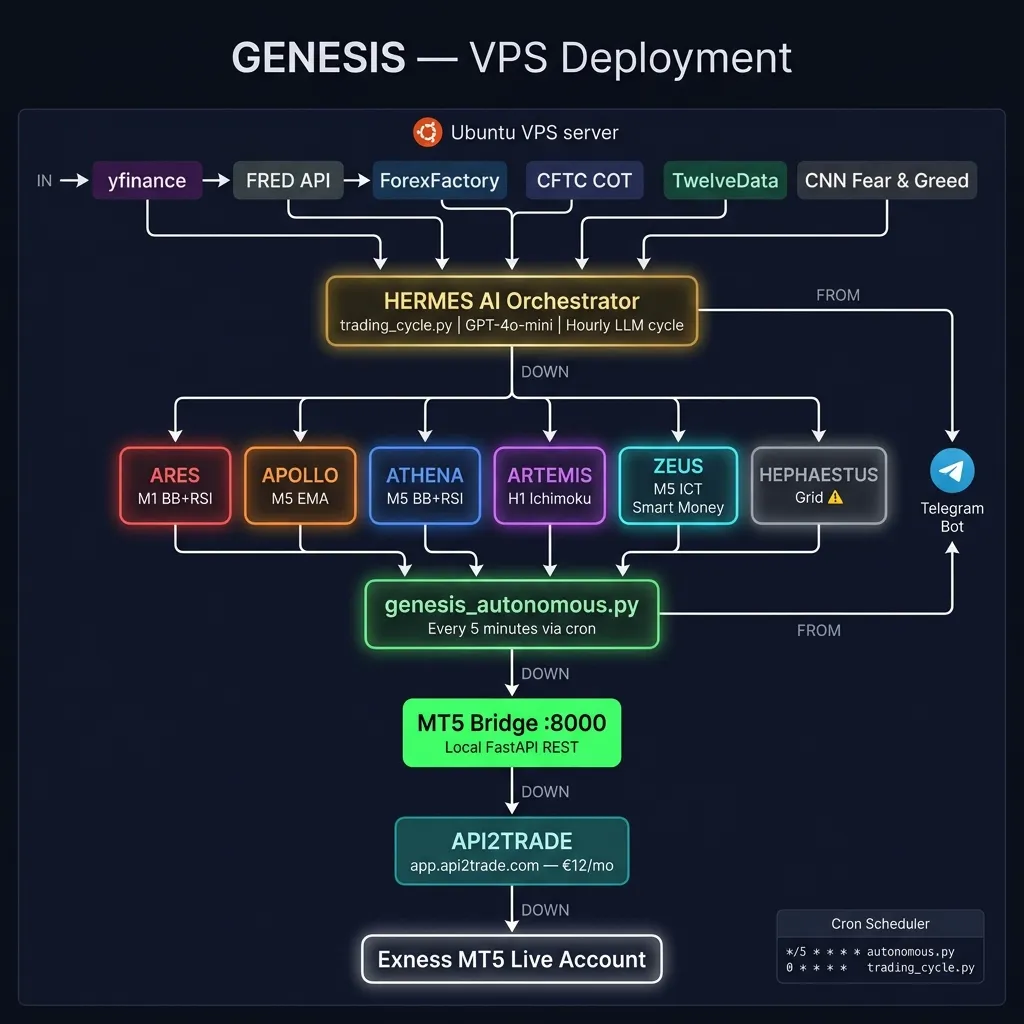
GENESIS is 8,401 lines of Python split across 44 files that form a complete autonomous trading engine. It runs six independent strategy bots on a cron schedule, managed by an LLM orchestrator named Hermes, all talking to a MetaTrader 5 account through MetaTrader API over plain HTTPS.
It is not a tutorial skeleton: it is a system we built and debugged end to end, then ran against a demo MT5 account. It has not traded real money, and nothing below is evidence that its strategies are profitable. What it does show is how the moving parts fit together, so you can rebuild the architecture with your own strategies.
What the system does every 5 minutes:
genesis_autonomous.pyfires via cronIt checks the live MT5 account balance and open positions via MetaTrader API
It runs each active strategy bot as a subprocess
Each bot fetches market data (yfinance + MetaTrader API), computes indicators, and evaluates its signal conditions
If a bot returns
"action": "trade", Hermes validates the risk limitsIf risk passes,
/OrderSendplaces the order on the MT5 account through MetaTrader APIEvery decision — trade or no trade — is logged to
/var/log/hermes/and sent to Telegram
There is nothing to install on your side beyond Python: no local MetaTrader, no Windows server, no Expert Advisor for you to run and no proprietary SDK. Just Python and HTTP.
2. Why REST Instead of a Local MT5 Installation
The standard approach to MT5 automation is to run an Expert Advisor (EA) in a Windows-based MetaTrader 5 desktop app and use either the built-in MQL5 language or the MetaTrader5 Python package, which requires MetaTrader 5 running on your own PC or VPS.
This creates several real problems:
| Problem | Local MT5 approach | MetaTrader API approach |
|---|---|---|
| OS requirement | Windows only | Any OS, any cloud |
| Always-on requirement | MetaTrader must be running 24/5 on your machine | MetaTrader API keeps the account connected |
| Language | MQL5 (proprietary) | Pure Python |
| Deployment | Manual MetaTrader management | docker compose up |
| Remote access | RDP into a Windows VPS | REST calls from anywhere |
| Broker switching | Reinstall MetaTrader | Change the account id in .env |
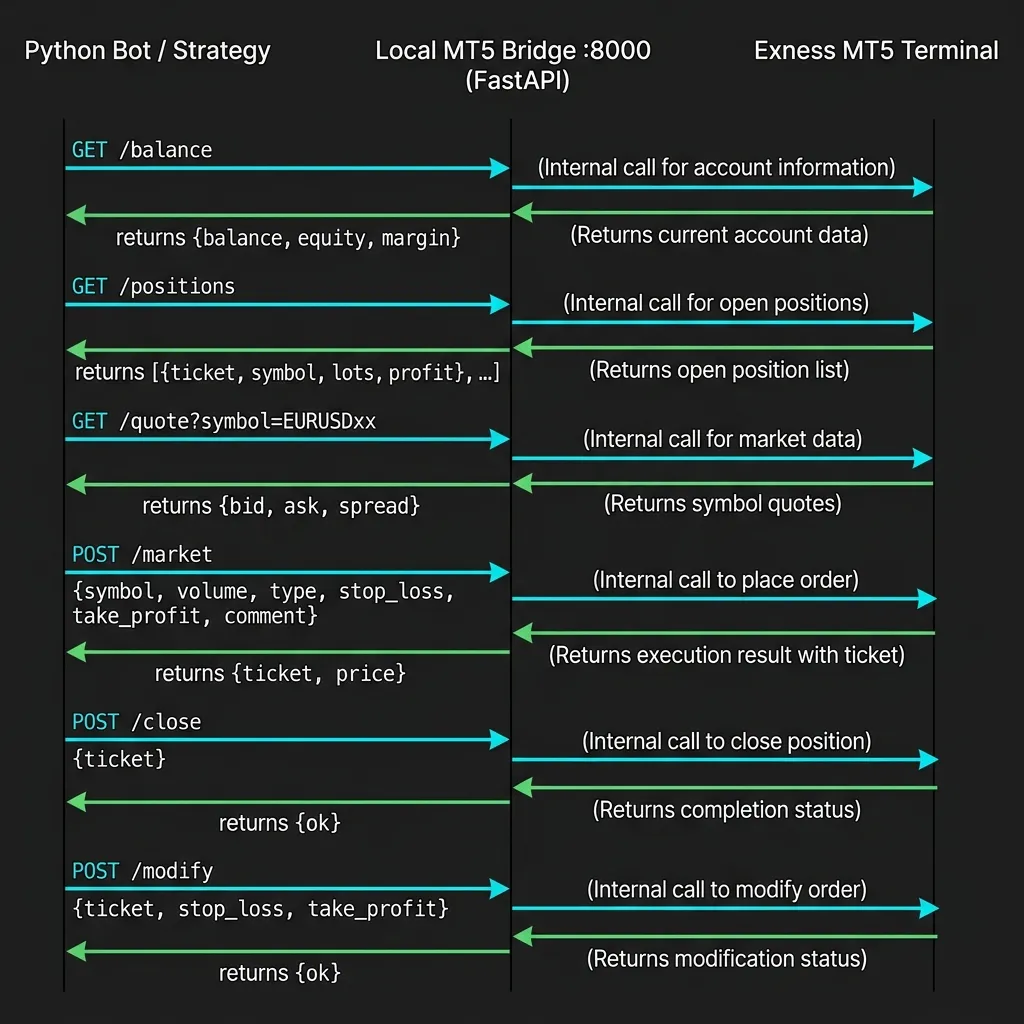
We originally built GENESIS with a local FastAPI bridge (127.0.0.1:8000) that translated Python calls into the MetaTrader5 Python library. This worked, but added a fragile extra layer: the bridge had to be running, the MT5 desktop app had to be running, and both had to be on the same Windows machine.
We removed the bridge entirely in GENESIS v2.1. Every strategy now calls MetaTrader API's REST endpoints directly from Python. The architecture became dramatically simpler:
Before (v1): Python → FastAPI Bridge → MetaTrader5 SDK → MT5 Desktop App → Broker
After (v2):  Python → MetaTrader API (REST) → Broker
3. Core Architecture — How All Parts Connect
The complete GENESIS v2.1 architecture: six strategy bots reach MetaTrader 5 through MetaTrader API — no local bridge, no Windows server required.
File Structure
Genesis-Metatrader-Automatic-AI-Trading-System/
├── setup.sh                      # Interactive setup wizard (run first)
├── install.sh                    # Ubuntu 22.04 VPS installer
├── docker-compose.yml            # Docker deployment
│
├── core/
│   ├── genesis_autonomous.py     # Main engine — runs every 5 min via cron
│   ├── trading_cycle.py          # Hermes LLM brain — runs every hour
│   ├── genesis_daily_report.py   # 06:00 UTC daily P&L summary
│   ├── genesis_brain_feed.py     # :30 min Telegram market summary
│   ├── heartbeat.py              # Health check every 10 min
│   └── tg_notify.py              # Telegram helper
│
├── strategies/
│   ├── ares/                     # BB+RSI M1 mean reversion
│   │   ├── ares_cycle.py         # 643 lines — signal logic + API calls
│   │   └── ares_tool.py          # CLI entry point
│   ├── apollo/                   # EMA trend following (613 lines)
│   ├── athena/                   # BB+RSI multi-TF ranging (622 lines)
│   ├── artemis/                  # Ichimoku H1 breakout (498 lines)
│   ├── zeus/                     # ICT Smart Money M5 (643 lines)
│   └── hephaestus/               # Grid/Martingale (549 lines)
│
├── configs/                      # YAML config per strategy
└── backtest/                     # Python backtester + MT5 EA
The Cron Schedule
*/5 * * * *   genesis_autonomous.py    # Strategy scan — every 5 min
0 * * * *     trading_cycle.py         # Hermes LLM macro — hourly
30 * * * *    genesis_brain_feed.py    # Market summary to Telegram — at :30
0 6 * * *     genesis_daily_report.py  # Daily P&L — 06:00 UTC
0 7 * * 1-5   genesis_market_open.py   # Market open alert — weekdays
*/10 * * * *  heartbeat.py             # Health check — every 10 min
4. The MetaTrader API Integration — Every Real Endpoint Used
MetaTrader API (app.metatraderapi.net) provides a REST API that connects to your MetaTrader 5 account. Every request carries your API key in the x-api-key header and the account id (a UUID, the id query parameter) that identifies which MT5 account you're targeting.
Authentication:
API key:     mt5api_...  (x-api-key header; from the account's card in the dashboard)
Account id:  a UUID      (?id=...; shown on the account's card once it is connected)
Base URL:    https://api.metatraderapi.net
Every endpoint GENESIS actually calls:
# ── Account ──────────────────────────────────────────────────────────────────

# Every call: header "x-api-key: mt5api_..." plus ?id=<account id>

# Check balance, equity, margin, leverage
GET /AccountSummary?id={id}
→ {"balance": 10000.0, "equity": 10000.0, "freeMargin": 10000.0, "currency": "USD",
   "leverage": 1000, "type": "demo", "synced": true, ...}

# ── Positions ────────────────────────────────────────────────────────────────

# Open positions and pending orders, as order objects
GET /OpenedOrders?id={id}
→ [{"ticket": 12345678, "symbol": "EURUSDxx", "orderType": 0, "lots": 0.1,
    "volume": 1000, "openPrice": 1.08542, "profit": 12.30, "expertId": 1001,
    "comment": "GENESIS-ARES", "openTimestampUTC": 1791796502, ...}]

# ── Market Data ──────────────────────────────────────────────────────────────

# Live bid/ask quote (used for spread check + entry price)
GET /GetQuote?id={id}&symbol=EURUSDxx
→ {"symbol": "EURUSDxx", "bid": 1.08540, "ask": 1.08542, "time": "...", ...}

# OHLC bars (M1, M5, H1, H4, D1): from/to in UTC, ISO-8601 or unix seconds
GET /PriceHistory?id={id}&symbol=EURUSDxx&timeFrame=M5&from=2026-10-12T00:00:00Z&to=2026-10-12T16:40:00Z
→ [{"time": "...", "openPrice": ..., "highPrice": ..., "lowPrice": ..., "closePrice": ..., "tickVolume": ...}]

# ── Trade Execution ──────────────────────────────────────────────────────────

# Open a position (stoploss/takeprofit are absolute prices)
GET /OrderSend?id={id}&symbol=EURUSDxx&operation=Buy
    &volume=0.1&stoploss=1.08392&takeprofit=1.08842&comment=GENESIS-ARES
    &expertId=1001&clientOrderId=ares-20261012-0001
→ {"ticket": 12345678, "symbol": "EURUSDxx", "orderType": 0, "lots": 0.1,
   "volume": 1000, "openPrice": 1.08542, "state": 10009, ...}
   # HTTP 200 with state != 10009 = the broker refused it

# Modify SL/TP on an open position
GET /OrderModify?id={id}&ticket=12345678&stoploss=1.08450&takeprofit=1.08900

# Close a position fully or partially (lots omitted = full close)
GET /OrderClose?id={id}&ticket=12345678&lots=0.1
How the bridge() function works inside each strategy:
Every strategy module has a single bridge() function that routes logical API calls to the correct endpoint:
# Simplified from ares_cycle.py
import os, uuid, requests

MT5_API = "https://api.metatraderapi.net"
MT5_ID = os.environ["MTAPI_ID"]        # account id (UUID)
session = requests.Session()
session.headers["x-api-key"] = os.environ["MTAPI_KEY"]   # mt5api_...
TIMEOUT = 75   # the API waits up to 30 s for the broker and retries a timed-out read once

def api(endpoint, **params):
    r = session.get(f"{MT5_API}/{endpoint}", params={"id": MT5_ID, **params}, timeout=TIMEOUT)
    r.raise_for_status()
    return r.json()

def bridge(path, data=None) -> dict:
    """Single entry point for all MT5 API calls."""
    ep_map = {
        "/balance": "AccountSummary",
        "/positions": "OpenedOrders",
    }
    if path.startswith("/quote"):
        symbol = path.split("symbol=")[-1]
        raw = api("GetQuote", symbol=symbol)
        return {"bid": raw["bid"], "ask": raw["ask"]}

    if path == "/market" and data:
        order = api(
            "OrderSend",
            symbol=data["symbol"],
            operation=data["type"],          # "Buy" or "Sell"
            volume=data["volume"],           # lots
            stoploss=data["stop_loss"],      # absolute price
            takeprofit=data["take_profit"],  # absolute price
            comment=data.get("comment", "GENESIS"),
            expertId=data.get("magic", 1001),
            clientOrderId=f"genesis-{uuid.uuid4().hex[:20]}",  # safe to retry
        )
        # A broker refusal is HTTP 200: only state 10009 means done.
        if order.get("state") != 10009:
            return {"ticket": None, "refused": order.get("state")}
        return {"ticket": order["ticket"], "price": order["openPrice"]}

    # AccountSummary, OpenedOrders, etc.
    return api(ep_map.get(path, path.lstrip("/")))
This design means adding a new strategy only requires copying one of the existing cycle files and modifying the signal logic — the API integration layer is already there.
5. The Six Strategy Gods — Real Implementation Deep Dive
Each strategy has a distinct market regime where it performs best. Running all six in parallel means the system has something to say in trending, ranging and volatile conditions.
Every strategy follows the same interface contract. The run_analysis(symbol) function always returns an object of this shape (| separates the possible values):
{
  "action": "trade" | "wait",
  "reason": "Human-readable explanation",
  "direction": "Buy" | "Sell",
  "symbol": "EURUSDxx",
  "entry": 1.08542,
  "stop_loss": 1.08392,
  "take_profit": 1.08842,
  "volume": 0.10,
  "sl_pips": 15.0,
  "rr_ratio": 2.0,
  "confidence": "high" | "medium",
  "conditions_met": ["RSI oversold", "BB lower touch", ...],
  "conditions_failed": [...]
}
This uniform interface is what allows genesis_autonomous.py to run all six bots and process results identically.
ARES — Bollinger Bands + RSI Mean Reversion (M1)
File: strategies/ares/ares_cycle.py · 643 lines
ARES is designed for scalping in choppy, ranging markets. The core thesis: when price closes outside the Bollinger Band AND RSI is in extreme territory, it tends to snap back to the mean.
Signal conditions (both required for a trade):
# BUY signal — from the actual implementation
RSI_OVERSOLD = 30

def ares_buy_signal(close, bb_lower, rsi, require_outside=True, require_rsi=True):
    return (
        close < bb_lower           # Price closed below lower BB (2.0 std dev, 20 period)
        and rsi < RSI_OVERSOLD     # RSI < 30 (oversold)
        and require_outside        # Must be a true band pierce, not just a touch
        and require_rsi            # Both conditions must hold simultaneously
    )

# Additional strictness gate
# ADX < 25 = ranging market (preferred for mean reversion)
# M15 context MA check = trend not strongly against us
Indicator computation (using the ta library):
def compute_bb_rsi(bars, bb_period=20, bb_dev=2.0, rsi_period=14):
    import pandas as pd
    import ta
    df = pd.DataFrame(bars)
    bb_lower = ta.volatility.bollinger_lband(df["close"], window=bb_period, window_dev=bb_dev)
    bb_upper = ta.volatility.bollinger_uband(df["close"], window=bb_period, window_dev=bb_dev)
    rsi = ta.momentum.rsi(df["close"], window=rsi_period)
    adx = ta.trend.adx(df["high"], df["low"], df["close"], window=14)
    return {
        "bb_lower": float(bb_lower.iloc[-2]),   # Last CLOSED bar, not the forming bar
        "bb_upper": float(bb_upper.iloc[-2]),
        "rsi": float(rsi.iloc[-2]),
        "adx": float(adx.iloc[-2]),
    }
Config parameters (configs/ares_config.yaml):
| Parameter | Value | Reason |
|---|---|---|
| BB period | 20 | Standard deviation window |
| BB std dev | 2.0 | ~95% price capture |
| RSI period | 14 | Standard Wilder smoothing |
| RSI oversold | 30 | Classic threshold |
| RSI overbought | 70 | Classic threshold |
| Max spread | 1.0 pip | M1 scalp — tight spread critical |
| Session | 07:00–21:00 GMT | London and New York sessions |
| SL | 20 pips | Fixed for M1 regime |
| TP | 40 pips | 1:2 minimum R:R |
Key implementation detail: We use iloc[-2] (second-to-last row) everywhere, not iloc[-1]. This is because the last bar is still forming — computing indicators on an incomplete bar causes lookahead bias. This single detail separates a realistic backtest from a profitable-looking one.
APOLLO — EMA 9/21 Trend Following (M5)
File: strategies/apollo/apollo_cycle.py · 613 lines
APOLLO trades momentum. It only enters when price is moving strongly in one direction, confirmed by two EMAs and volume context.
Signal logic:
# EMA crossover + price position
def apollo_buy_signal(close, ema9, ema21, atr, atr_threshold, rsi, trend_ma_50):
    return (
        ema9 > ema21               # Fast EMA above slow EMA (trend up)
        and close > ema9           # Price above both EMAs (momentum confirmed)
        and atr > atr_threshold    # Sufficient volatility (not a dead market)
        and rsi > 50               # Momentum bias
        and trend_ma_50 < close    # 50-period MA context: overall uptrend
    )
APOLLO avoids the most common EMA crossover failure mode — entering on a fake cross during consolidation — by requiring three separate confirmations: the cross itself, price position relative to both MAs, and an ATR-based volatility floor.
ATHENA — Multi-Timeframe BB+RSI Ranging (M5)
File: strategies/athena/athena_cycle.py · 622 lines
ATHENA is ARES's older sibling. Same BB+RSI core but on M5 (more signal stability, fewer noise trades) with an additional multi-timeframe filter: the H1 chart must not be in a strong trend (ADX check) before ATHENA enters a mean-reversion trade.
The key difference from ARES:
ARES: fast, M1, tighter spreads, more signals
ATHENA: slower, M5, wider spread tolerance (1.5 pips), multi-TF confirmation required
ARTEMIS — Ichimoku Kumo Breakout (H1)
File: strategies/artemis/artemis_cycle.py · 498 lines
ARTEMIS uses the full five-component Ichimoku system: Tenkan-sen (9), Kijun-sen (26), Senkou Span A, Senkou Span B (52), and Chikou Span (26-bar displacement).
The Ichimoku computation challenge — displacement:
This is the part that trips up most Ichimoku implementations. Senkou Spans A and B are plotted 26 bars forward in the future. To get the cloud at the current bar, you read the Span values at index -(DISP + 2) in the historical series:
# highs, lows, closes: pandas Series of bar data
def midpoint(highs, lows, period):
    return (highs.rolling(period).max() + lows.rolling(period).min()) / 2

def compute_ichimoku(highs, lows, closes):
    DISP = 26                                   # displacement
    tenkan = midpoint(highs, lows, period=9)
    kijun = midpoint(highs, lows, period=26)
    span_a = (tenkan + kijun) / 2               # Will be plotted DISP bars ahead
    span_b = midpoint(highs, lows, period=52)   # Will be plotted DISP bars ahead

    # Current cloud = values calculated DISP bars AGO (now displayed at the current bar)
    cloud_idx = -(DISP + 2)
    sa_current = float(span_a.iloc[cloud_idx])  # ← This is the key
    sb_current = float(span_b.iloc[cloud_idx])
    kumo_top = max(sa_current, sb_current)
    kumo_bottom = min(sa_current, sb_current)

    # Chikou Span: last closed price vs the close 26 bars before it
    chikou_bullish = float(closes.iloc[-2]) > float(closes.iloc[-2 - DISP])
    return {"kumo_top": kumo_top, "kumo_bottom": kumo_bottom, "kijun": float(kijun.iloc[-2]),
            "chikou_bullish": chikou_bullish}
Signal conditions (7 total, minimum 5 must pass for a trade):
CONF_BARS = 2

def artemis_buy_signal(close, kumo_top, kijun, future_cloud, cloud_color, chikou_bullish, rsi, conf_bars):
    buy_conditions = [
        (close > kumo_top, "Price above Kumo"),
        (future_cloud == "green", "Future cloud GREEN — SpanA > SpanB ahead"),
        (cloud_color == "green", "Current cloud GREEN"),
        (chikou_bullish, "Chikou above price 26 bars ago"),
        (rsi > 50, "RSI above 50"),
        (close > kijun, "Price above Kijun-sen"),
        (conf_bars >= CONF_BARS, f"{conf_bars} bars confirmed above Kumo"),
    ]
    passed_conditions = [name for ok, name in buy_conditions if ok]
    # Signal fires only if 5+ conditions pass
    if len(passed_conditions) >= 5:
        all_7 = len(passed_conditions) == 7
        return {"action": "trade", "confidence": "high" if all_7 else "medium"}
    return {"action": "wait", "reason": f"Only {len(passed_conditions)}/7 Ichimoku conditions met"}
ARTEMIS is the most selective strategy — it typically generates 2–8 signals per day on a given symbol and has the highest R:R target (2.5:1 minimum) because H1 setups allow wider SL placement using the Kijun-sen as the natural stop level.
ZEUS — ICT Smart Money Concepts (M5)
File: strategies/zeus/zeus_cycle.py · 643 lines
ZEUS combines three ICT concepts into one confluence score. The liquidity sweep is the trigger and carries the most weight; the fair value gap, the order block and the killzone timing add confirmation. With the default threshold of 4 out of 6 points, a trade needs the sweep plus at least one strong confirmation, which keeps ZEUS high-conviction but low-frequency.
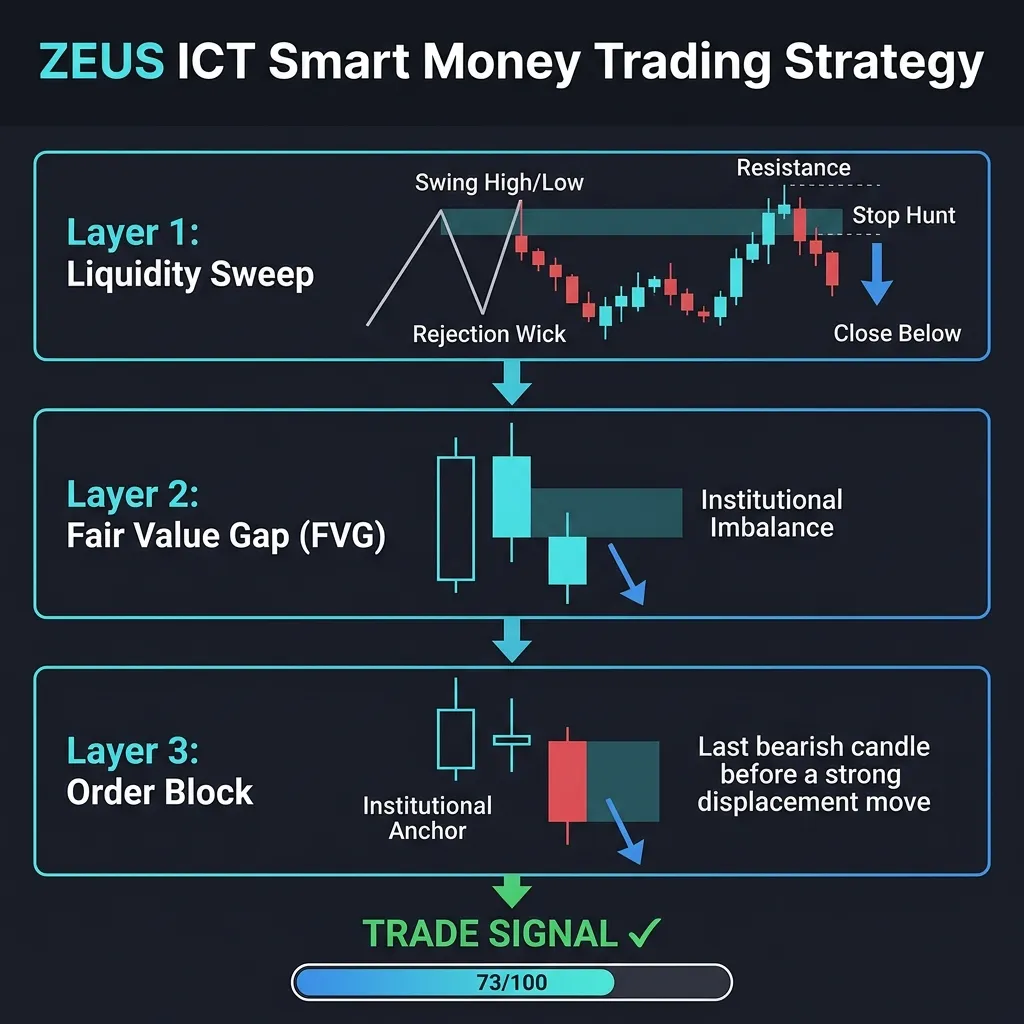
Layer 1 — Liquidity Sweep Detection:
A liquidity sweep occurs when price briefly exceeds a recent swing high/low (triggering stop orders clustered there) then reverses. The rejection must happen within the same or next candle:
def detect_swing_highs(highs, lookback):
    return [highs[i] for i in range(lookback, len(highs) - lookback)
            if highs[i] == max(highs[i - lookback:i + lookback + 1])]

def detect_liquidity_sweep(highs, lows, closes, opens, swing_lb=3, sweep_tol=0.0001, req_reject=True):
    # Find swing highs in the last 30 closed bars
    sw_highs = detect_swing_highs(highs[-32:-2], lookback=swing_lb)

    # Last closed candle
    cur_h, cur_c = highs[-2], closes[-2]

    for level in sw_highs:
        wick_above = cur_h > level * (1 + sweep_tol)   # Price pierced the level
        closed_below = cur_c < level                    # But closed back below
        if wick_above and closed_below and req_reject:
            return {"type": "BearSweep", "level": level, "candle_idx": -2}
    return None   # (the bullish sweep below swing lows mirrors this)
Layer 2 — Fair Value Gap (FVG) Detection:
An FVG is a 3-candle imbalance: the high of candle N is below the low of candle N+2, leaving a gap that price is expected to eventually fill:
def detect_fvg(highs, lows, direction, fvg_age=20, pip_size=0.0001, min_gap_pips=2.0):
    # Three-candle imbalance
    for i in range(-fvg_age, -2):
        c1_high = highs[i - 1]
        c3_low = lows[i + 1]
        if direction == "bull" and c1_high < c3_low:
            gap_size = (c3_low - c1_high) / pip_size
            if gap_size >= min_gap_pips:
                return {"top": c3_low, "bottom": c1_high, "age_bars": abs(i)}
    return None
Layer 3 — Order Block Detection:
The Order Block is the last candle before a strong displacement move — typically a large institutional entry point:
def detect_order_block(bars, displacement_idx, min_body_ratio=0.7):
    # bars: list of {"open", "high", "low", "close"}; displacement_idx: the biggest move
    # in the last OB_AGE bars. The order block is the candle BEFORE it:
    # bullish OB = last bearish candle before a bullish surge (bearish OB mirrors it)
    d = bars[displacement_idx]
    body_ratio = abs(d["close"] - d["open"]) / (d["high"] - d["low"])
    if body_ratio >= min_body_ratio:            # Strong displacement candle
        ob_candle = bars[displacement_idx - 1]
        return {"top": ob_candle["high"], "bottom": ob_candle["low"]}
    return None
ICT Confluence Score:
Each layer contributes points. A minimum score of MIN_SCORE (configurable in zeus_config.yaml) is required for trade execution. London (07:00–10:00 GMT) and New York (13:00–16:00 GMT) killzones add a +1 bonus:
def zeus_decision(liquidity_sweep, fvg, order_block, in_killzone, min_score=4):
    score = 0
    if liquidity_sweep: score += 2   # Highest weight — the sweep is the trigger
    if fvg: score += 1               # Confirms displacement
    if order_block: score += 2       # Confirms the institutional entry zone
    if in_killzone: score += 1       # Time-based bonus

    if liquidity_sweep and score >= min_score:   # Default: 4 out of 6
        return {"action": "trade", "score": score}
    return {"action": "wait", "score": score}
HEPHAESTUS — Grid / Martingale (Continuous)
File: strategies/hephaestus/hephaestus_cycle.py · 549 lines
HEPHAESTUS operates differently from the five signal-based strategies. It maintains a grid of positions at defined price levels and manages the exposure dynamically, so it is not part of the signal scans shown later. It does not use yfinance for bars — it only needs the current price from the MetaTrader API /GetQuote endpoint and the list of open positions.
⚠️ Risk warning: Grid/Martingale strategies can accumulate significant exposure in trending markets. HEPHAESTUS is included as an implementation example and should be tested thoroughly on demo before using on a live account.
6. Hermes — The LLM Orchestration Brain
trading_cycle.py runs every hour and asks GPT-4o-mini a structured prompt containing:
Current account balance and equity
Open positions and their P&L
Recent market conditions (pulled from yfinance)
Which strategies are currently active
Recent trade journal entries
GPT-4o-mini responds with a structured JSON decision:
{
  "market_regime": "ranging",
  "preferred_strategies": ["ares", "athena"],
  "suppress_strategies": ["apollo"],
  "risk_adjustment": 0.8,
  "reasoning": "EUR/USD has been oscillating in a 50-pip range since 09:00. Mean reversion strategies favored. Apollo trend following suppressed until breakout confirmation.",
  "macro_notes": "Fed minutes tomorrow 19:00 UTC — reduce position sizes by 20% after 17:00."
}
genesis_autonomous.py reads these instructions before running each strategy cycle. If Hermes has suppressed a strategy, that bot is skipped. If a risk adjustment is in effect, the calculated lot size is multiplied by the adjustment factor.
The critical design principle: Hermes cannot override the hard risk limits encoded in each strategy. Even if Hermes tells ARES to trade, ARES still independently checks balance, spread, position count, and R:R. The LLM layer is advisory, not authoritative.
7. Market Data — Multi-Source Fallback Architecture
GENESIS has a three-tier fallback for price data. This was an engineering necessity: some MT5 brokers (like Deriv Demo) don't quote every symbol for every account, and Yahoo Finance blocks Docker container IPs intermittently.
For OHLCV bars (strategy signal computation):
# yfinance with symbol mapping
YF_MAP = {
    "EURUSDxx": "EURUSD=X", "GBPUSDxx": "GBPUSD=X",
    "USDJPYxx": "USDJPY=X", "GBPJPYxx": "GBPJPY=X",
    "XAUUSDxx": "GC=F",
}

def load_bars(mt5_symbol):
    import yfinance as yf
    return yf.download(YF_MAP[mt5_symbol], period="5d", interval="1m",
                       progress=False, auto_adjust=True)
For quotes (spread check + entry price):
import requests

def get_quote(symbol, base_ccy, quote_ccy):
    # Tier 1: MetaTrader API /GetQuote (the broker's live feed — the only tradable price)
    r = session.get(f"{MT5_API}/GetQuote",
                    params={"id": MT5_ID, "symbol": symbol}, timeout=75)
    if r.status_code == 200:
        raw = r.json()
        if raw.get("bid", 0) > 0:
            return {"bid": raw["bid"], "ask": raw["ask"], "tradable": True}

    # Tier 2: open.er-api.com (free reference rates, no API key, updated about hourly)
    r = requests.get(f"https://open.er-api.com/v6/latest/{base_ccy}", timeout=8)
    price = r.json().get("rates", {}).get(quote_ccy)   # e.g. base=EUR, quote=USD → EURUSD
    if not price:
        # Tier 3: Frankfurter API (ECB reference rates, once per working day; no gold)
        r = requests.get(f"https://api.frankfurter.app/latest?from={base_ccy}&to={quote_ccy}", timeout=8)
        price = r.json().get("rates", {}).get(quote_ccy)
    if price:
        spread = 0.00015   # 1.5 pip synthetic spread
        return {"bid": price - spread / 2, "ask": price + spread / 2, "tradable": False}
    return None
Why this matters: This fallback chain keeps the analysis pipeline running even when:
The MT5 broker quote stream is delayed or unavailable
You're on a cloud provider that Yahoo Finance rate-limits
You're testing on a broker that only quotes certain symbols
⚠️ Never trade on the fallback prices. Tiers 2 and 3 are hourly or daily reference rates, not prices you can trade at, and the ECB publishes no gold rate at all. GENESIS marks them "tradable": False and uses them only to keep the analysis running on demo; entries, stops and spread checks on a live account must use the broker's own quote (Tier 1).
8. Risk Management — The Hard Layer
Every strategy enforces these checks in order before returning "action": "trade". None can be bypassed by Hermes or any other component.
1. Account equity > 0                 → "Account equity is zero or unavailable"
2. No duplicate position already open → "Strategy X position already open"
3. Cooldown period (configurable)     → "Cooldown: 847s remaining"
4. Is it a trading session?           → "Outside session GMT 07–21"
5. Spread ≤ max_spread_pips           → "Spread 2.3 > max 1.5 pips"
6. No high-impact news ±15 min        → "News block: NFP in 8 min"
7. Sufficient bar data                → "Insufficient M1 bar data"
8. Indicator validity                 → "Indicator values None"
9. Signal conditions met              → "Only 3/7 conditions met"
10. R:R ≥ minimum ratio               → "R:R 1.2 < minimum 1.5"
Lot sizing — dynamic, risk-based:
RISK_PCT = 0.01   # 1% risk per strategy

def calculate_lot(equity, sl_pips, symbol):
    # Pip value per lot (approximate)
    pip_value = {
        "EUR": 10.0,   # EURUSD: $10/lot/pip
        "GBP": 12.5,   # GBPUSD: ~$12.50/lot/pip
        "JPY": 9.0,    # USDJPY: ~$9/lot/pip
        "XAU": 1.0,    # XAUUSD: $1/lot/pip (0.1 pip instrument)
    }
    pv = pip_value.get(symbol[:3], 10.0)

    # Risk amount = equity × risk_pct (e.g. 1% of $10,000 = $100)
    risk_amount = equity * RISK_PCT
    raw_lots = risk_amount / (sl_pips * pv)
    return round(max(0.01, min(raw_lots, 3.0)), 2)   # Hard cap: 3.0 lots maximum
With a $10,000 account, 1% risk, and 20-pip SL on EURUSD:
$100 ÷ (20 pips × $10/pip) = 0.50 lots
9. How to Replicate This — Complete Step-by-Step
Step 1: Get Your MetaTrader API Account
Sign up at app.metatraderapi.net and start the subscription. Connect your MT5 account by providing your broker login, main (trading) password, and the exact server name. The connection usually becomes ACTIVE within 1–2 minutes. The account's card then shows its account id (a UUID) — this is your MTAPI_ID in the .env file.
Cost: $14 per connected MT5 account (one seat) per month. There is no free trial; use a broker demo account while you build.
The account id is a UUID of the form xxxxxxxx-xxxx-xxxx-xxxx-xxxxxxxxxxxx.
On the same card, click "Generate key" to get your API key (mt5api_...). It is shown once; store it as a secret. It goes in the x-api-key header of every request.
Step 2: Set Up Your Telegram Bot
Message @BotFather on Telegram →
/newbotGive it a name (e.g. "GENESIS Alerts")
Copy the bot token. It looks like
123456789:ABCdefGhIJKlmNoPQRsTUVwxyZ(this one is a placeholder)Message @userinfobot to get your numeric Chat ID
Step 3: Lay Out the Project and Configure
Create the directory structure from section 3 (the repository is not public, so you write the strategy files yourself; the bridge() function from section 4 is the shared API layer). Then put the credentials in a .env file, never in code:
MTAPI_KEY=mt5api_...            # API key, x-api-key header
MTAPI_ID=YOUR_ACCOUNT_ID        # account UUID, ?id=
OPENAI_API_KEY=sk-...           # Hermes LLM brain
TELEGRAM_BOT_TOKEN=your_bot_token
TELEGRAM_CHAT_ID=your_chat_id
Check the credentials before anything else:
curl -s -H "x-api-key: $MTAPI_KEY" "https://api.metatraderapi.net/AccountSummary?id=$MTAPI_ID"
Step 4: Deploy with Docker (Local or VPS)
# Build and start
docker compose up -d

# Watch startup logs
docker logs -f genesis

# Expected output (our build's entrypoint):
# ✓ MTAPI_ID = xxxxxxxx••••
# ✓ Verifying MetaTrader API connection...
# ✓ Connected | Balance: 10,000.00 USD [demo]
# ✓ 6 cron jobs installed
Step 5: Run Your First Scan
# Analyze EURUSD across the five signal strategies (HEPHAESTUS runs its grid continuously)
docker exec -it genesis genesis-scan EURUSDxx

# Expected output (example):
# === GENESIS FULL SCAN: EURUSDxx ===
# --- ares --- WAIT | Outside session GMT 07–21
# --- apollo --- WAIT | ADX 18.2 < min 20 (trending required)
# --- athena --- WAIT | Spread 1.8 > max 1.5 pips
# --- artemis --- WAIT | Only 3/7 Ichimoku conditions met
# --- zeus --- WAIT | No liquidity sweep detected in last 30 bars

# Or analyze a single strategy in detail
docker exec -it genesis ares analyze EURUSDxx
Step 6: VPS Deployment
For 24/7 autonomous trading, a VPS is essential. Recommended specs: 2 vCPU, 4 GB RAM, Ubuntu 22.04. A small Linux VPS costs roughly $5–9 per month.
# On your VPS, after copying the project over:
bash install.sh

# What our install.sh does:
# 1. Installs Python 3.11 and pip
# 2. Creates venv at /opt/hermes-agent/.venv-hermes
# 3. Installs all dependencies from requirements.txt
# 4. Creates CLI shortcuts: ares, apollo, athena, artemis, zeus, hephaestus, genesis-scan
# 5. Writes /etc/cron.d/genesis with the 6 cron jobs
# 6. Creates /var/log/hermes/ log directories
# 7. Sends a test Telegram message confirming the installation
Step 7: Customize a Strategy
Each strategy is a self-contained Python module. To modify ARES's signal thresholds without touching code:
# configs/ares_config.yaml
bollinger:
  period: 20          # ← Change BB window
  std_dev: 2.5        # ← Wider band = fewer but higher quality signals

rsi:
  period: 14
  oversold: 25        # ← Stricter oversold threshold (was 30)
  overbought: 75      # ← Stricter overbought threshold

risk:
  risk_pct: 0.01      # ← 1% per trade
  max_spread_pips: 1.0
  min_rr_ratio: 2.0   # ← Minimum 1:2 reward-to-risk
To write a completely new strategy:
Copy
strategies/ares/tostrategies/mybot/Rename
ares_cycle.pytomybot_cycle.pyandares_tool.pytomybot_tool.pyReplace the
run_analysis()logic with your signal conditionsKeep the
bridge()function and the return format unchangedAdd your strategy to
genesis_autonomous.py's bot list
10. Infrastructure and Real Costs
Monthly Running Costs
| Service | Cost | What for |
|---|---|---|
| MetaTrader API | $14 per month | REST API — 1 seat (1 MT5 account) |
| VPS | ~$5–9/month | 2 vCPU, 4 GB RAM, Ubuntu 22.04 |
| OpenAI (GPT-4o-mini) | ~$5–16/month | Hermes LLM brain — hourly cycles |
| Telegram Bot | Free | All trade alerts and reports |
| open.er-api.com | Free | Reference-rate fallback for forex pairs (analysis only) |
| yfinance | Free | OHLCV bars for all strategies |
| Total | ~$24–39/month | Full autonomous system |
Development Investment (AI Tokens)
GENESIS was built over approximately 3 weeks using AI-assisted development (Claude/Gemini models). The estimated token usage across all development conversations:
| Phase | Description | Approx. tokens |
|---|---|---|
| Architecture design | System design, data flow decisions | ~200K |
| Strategy implementation | All 6 strategy bots coded and debugged | ~800K |
| Bridge removal refactor | Moving from the local bridge to the direct API | ~200K |
| Docker + deployment | Dockerfile, docker-compose, entrypoints | ~150K |
| Documentation + README | Case study, README, .env.example | ~200K |
| Debugging sessions | Auth issues, import paths, yfinance | ~250K |
| Total | ~1.8M tokens |
At current Claude/Gemini pricing (~$3–15 per million tokens depending on model), total AI-assisted development cost: approximately $5–27.
Compare this to hiring a professional quant developer at $100–200/hour to build the equivalent system. GENESIS represents roughly 200+ hours of equivalent development work.
11. Key Engineering Challenges and How We Solved Them
Challenge 1: The Local Bridge Was a Single Point of Failure
Problem: The original v1 used a FastAPI bridge at localhost:8000 that translated Python calls into the MetaTrader5 Python SDK. This meant three things had to be running simultaneously: the FastAPI bridge, the MT5 desktop app, and the Python strategies. Any one crashing silently would stop all trading.
Solution: Remove the bridge entirely. Every *_cycle.py file now has a bridge() function that calls MetaTrader API directly. The strategies became self-contained — each one can run independently without any other service.
# Before (v1) — required a local bridge running
def bridge_v1(path, data=None):
    r = requests.post(f"http://127.0.0.1:8000{path}", json=data)
    return r.json()

# After (v2) — direct REST call
def bridge_v2(path, data=None):
    r = session.get(f"{MT5_API}/AccountSummary",
                    params={"id": MT5_ID}, timeout=75)   # session carries the x-api-key header
    return r.json()
Challenge 2: Ichimoku Displacement — The Lookahead Trap
Problem: Every Ichimoku tutorial shows the cloud "shifted forward" visually, but when computing it in code, most implementations accidentally read the future cloud values at iloc[-1] instead of the current cloud projected at iloc[-(DISP+2)]. This creates a massive lookahead bias — the strategy "sees" cloud values that won't exist yet in real time.
Solution: Explicit displacement indexing. The current Kumo boundaries are the SpanA/B values calculated DISP bars ago:
def current_span_a(span_a, disp=26):
    cloud_idx = -(disp + 2)                  # DISP = 26 bars displacement
    return float(span_a.iloc[cloud_idx])     # ← Correct
    # NOT: span_a.iloc[-1] ← This is lookahead bias
Challenge 3: Yahoo Finance Rate Limiting Inside Docker
Problem: When testing GENESIS in Docker on a Mac, yf.download("EURUSD=X", ...) consistently returned empty DataFrames. Yahoo Finance blocks or rate-limits requests from Docker container IP ranges.
Solution: Three-tier quote fallback using free public APIs that don't rate-limit Docker IPs:
MetaTrader API
/GetQuote(the broker's live feed)open.er-api.com(free reference rates, no API key, updated about hourly)Frankfurter.app(ECB reference rates, once per working day)
Only the first one is a tradable price; the other two keep the analysis running in test environments. In production on a VPS, yfinance works normally.
Challenge 4: iloc[-2] vs iloc[-1] — Forming Bar Lookahead
Problem: When downloading 1-minute bars, the last row (iloc[-1]) is the bar currently forming — it has incomplete data. Computing indicators on it means your signal conditions are evaluated against a partial candle that will change before the bar closes.
Solution: Every indicator computation uses iloc[-2] — the last fully closed bar. This is implemented consistently across all six strategies:
def last_closed_indicators(df):
    import ta
    # Every strategy uses this pattern
    bb_lower = float(ta.volatility.bollinger_lband(df["close"], window=20).iloc[-2])
    rsi = float(ta.momentum.rsi(df["close"], window=14).iloc[-2])
    # Never iloc[-1] for signal computation
    return bb_lower, rsi
Challenge 5: Symbol Format Differences Between Brokers
Problem: Different MT5 brokers use different symbol names. Our Deriv demo account quoted EURUSDxx, Exness accounts use suffixes such as EURUSDm or EURUSDc, IC Markets uses EURUSD, and other brokers use forms like EURUSD. or EURUSD.pro. A system hard-coded to EURUSDxx breaks silently on other brokers.
Solution: Configurable symbol suffixes in YAML configs, plus a YF_MAP dictionary that maps MT5 symbols to their yfinance equivalents regardless of broker suffix:
# configs/ares_config.yaml
mt5:
  symbol_suffix: "xx"   # Change to "" for brokers without a suffix
YF_MAP = {
    "EURUSDxx": "EURUSD=X",
    "EURUSDm": "EURUSD=X",
    "EURUSD": "EURUSD=X",    # Works with any suffix variant
    "EURUSD.": "EURUSD=X",
}
12. Live Test Results — Deriv Demo Account
We ran GENESIS v2.1 against a Deriv Demo account ($10,000 USD, 1:1000 leverage) via MetaTrader API. Here is what actually happened:
MetaTrader API Account Connection:
Account connected → status ACTIVE → account id: <your account id>
AccountSummary:
  balance: 10000.0 USD
  equity: 10000.0 USD
  leverage: 1000
  type: demo
  synced: true
Scan of the five signal strategies on EURUSDxx:
=== GENESIS FULL SCAN — Deriv Demo $10k ===

 ARES    → WAIT | Spread 1.50 pips > max 1.0 pips
 APOLLO  → WAIT | Spread 1.50 pips > max 1.5 pips
 ATHENA  → WAIT | Spread 1.50 pips > max 1.5 pips
 ARTEMIS → WAIT | Insufficient H1 data (yfinance blocked in Docker)
 ZEUS    → WAIT | Insufficient M5 data (yfinance blocked in Docker)
Reading these results correctly:
ARES, APOLLO and ATHENA all reached the spread check gate — meaning they successfully connected to MetaTrader API, fetched the account balance ($10k confirmed), checked for open positions, validated the trading session, and obtained a fallback reference price (open.er-api.com plus the 1.5-pip synthetic spread). The log rounds the spread to two decimals: the computed value was fractionally above 1.5 pips, so APOLLO's and ATHENA's 1.5-pip limit rejected it too. Rejecting the trade is the correct behavior — a reference rate must never be traded on, and ARES's max is 1.0 pip for M1 scalping.
ARTEMIS and ZEUS returned "Insufficient data" because yfinance is blocked from Docker on this test machine. On a VPS, yfinance returns full H1 and M5 data normally, and both strategies complete their full analysis.
In other words: The entire MetaTrader API integration — authentication, account data, quote retrieval — and the risk layer worked correctly. The "WAIT" decisions are not failures — they are the system correctly declining to trade based on real conditions.
13. What to Do Next
If you are reading this as a developer looking to build your own system:
Minimum viable starting point:
Sign up at app.metatraderapi.net — connect a demo account, get its account id and an API key
Build the
bridge()layer from section 4 and one strategy (ARES is the simplest)Run it in analyze-only mode — confirm it connects to your account and logs its decisions
Spend 1 week watching the strategy outputs on demo before enabling execution
If you want to customize the strategies:
ARES's
ares_config.yamlis the cleanest to start with — change the Bollingerperiod,std_devand the RSIoversoldthreshold and observe the effect on signal frequencyZEUS follows institutional ICT concepts most closely — if you're familiar with them, it is the most interesting codebase to extend
If you want to scale across multiple accounts:
MetaTrader API supports multiple connected MT5 accounts — each gets its own account id; one API key can address all of them through
?id=You can run multiple
docker-composestacks with different.envfiles pointing to different accountsEach additional account is one more seat: $14 per month for seats 1–4, $13 for seats 5–19 and $12 from the 20th seat (up to 50 seats; more on request)
Create account: app.metatraderapi.net
Trading involves risk. Always test on a demo account before using real funds.
Ready to integrate the MetaTrader API?
REST, WebSocket and gRPC for MT4 and MT5. Pay per connected account.
Create account