Development · 10 min read · 2026-06-09
How to Connect MetaTrader 4 to Python (Without ZeroMQ or DLLs)
By MetaTrader API Editorial Team

Connect MT4 to Python without ZeroMQ sockets, C++ DLLs or MetaTrader crashes. Execute trades and stream quotes through MetaTrader API.
Python has become the undisputed standard for quantitative analysis, algorithmic trading, and machine learning. However, if your brokerage only supports MetaTrader 4 (MT4), you've likely hit a brick wall. Unlike MetaTrader 5 (MT5), which has an official, native Python integration library, MT4 is a Windows-only platform built on legacy architecture that does not natively support Python connectivity.
Traditionally, developers had to build custom C++ DLLs or write complex socket bridges (like ZeroMQ or raw TCP sockets) in MQL4 to stream quotes and execute orders.
In this guide, we'll cover why these traditional socket approaches are a developer's nightmare, and show you how to connect MT4 to Python and make the first API call in about ten minutes (the account connection itself is usually ACTIVE within 1–2 minutes) with the MetaTrader API REST and WebSocket API.
The ZeroMQ / Custom DLL Nightmare
To connect a Python script to a local MT4 installation, developers have historically relied on a bridge architecture. The most common setup involves running a local MQL4 Expert Advisor (EA) that links to a custom C++ DLL (such as a ZeroMQ wrapper), which acts as a socket server. Your Python script then connects to this local port to send orders and read prices.
While this sounds straightforward in theory, it introduces critical stability, scaling, and architectural issues in practice:
Single-Thread UI Blocking: MT4 is a single-threaded system. EAs and indicators share execution time with the UI thread. If your local ZeroMQ socket experiences latency, handles too many messages, or encounters a socket timeout, the entire MT4 desktop app freezes.
Resource Exhaustion: Running multiple local MT4 installations on a server to manage multiple accounts consumes massive amounts of RAM and CPU.
Memory Leaks and DLL Crashes: Custom C++ DLL imports are notorious for stability issues. Any unhandled exception on the socket layer can crash the MT4 executable silently, killing your algo trading mid-session.
"Trade Context Busy" Errors: If your Python script triggers multiple parallel executions, MT4 fails because it cannot handle concurrent trading commands on a single connection.
The Modern Alternative: Cloud-Native REST and WebSocket API
MetaTrader API solves the MT4-Python bridge problem with a hosted REST and WebSocket API in front of your trading accounts. Instead of running MetaTrader yourself, importing DLLs or writing socket protocol handlers, you work with your accounts through simple HTTPS requests and real-time WebSocket streams.
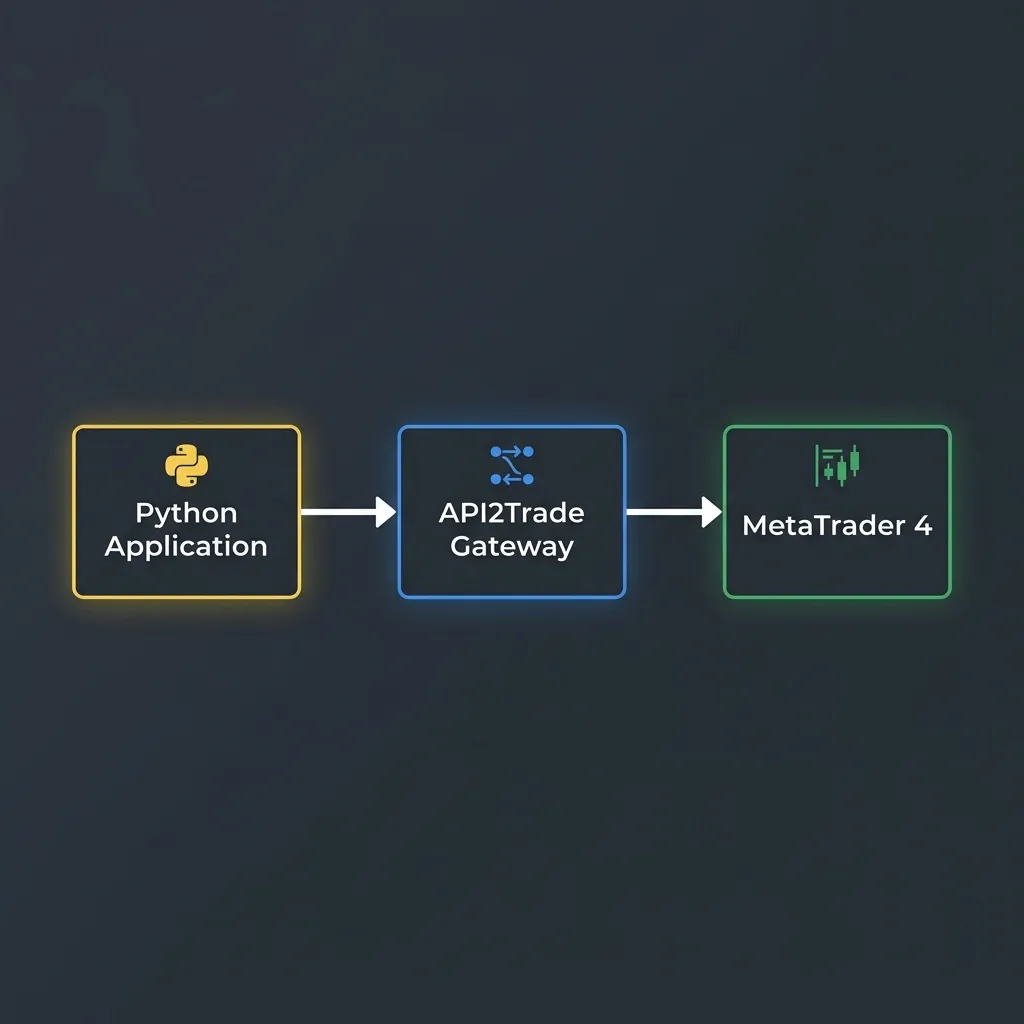
This architecture delivers key benefits:
- Nothing to install on your side: no VPS running dozens of MT4 desktop apps, no EA for you to run, no MetaTrader window to keep open.
- Standard JSON Payloads: Say goodbye to parsing proprietary MQL4 socket strings. Send and receive standard, structured JSON payloads.
- Concurrency by Default: Send requests from parallel workers over HTTPS instead of fighting over one desktop MT4 trade context (within the rate limit of 40-request bursts and 20 requests per second per key).
- Bi-directional WebSockets: Receive live quotes and executed trades directly into your Python async loop without polling endpoints.
Step-by-Step Guide: Connecting MT4 to Python
Let's walk through how to authenticate, request live account statistics, place orders, and stream live charts using Python and MetaTrader API.
Step 1: Initialize Your Python Environment
You only need standard, lightweight Python packages to get started. No DLLs or binary wheels required:
pip install requests "websockets>=14"
Step 2: Fetch Live MT4 Account Details
Every request needs two values from your MetaTrader API dashboard: the API key (starts with mt5api_), sent as the x-api-key header, and the account id (a UUID), sent as ?id= in the query string. The classic trading and market-data endpoints are plain GET requests, and the same calls work for MT4 and MT5 accounts.
import os
import requests

API = "https://api.metatraderapi.net"
API_KEY = os.environ["MTAPI_KEY"]      # mt5api_...
ACCOUNT_ID = os.environ["MTAPI_ID"]    # the account's UUID

session = requests.Session()
session.headers["x-api-key"] = API_KEY

def call(path: str, **params):
    """GET a classic endpoint for this account. 75 s covers the API's own 30 s wait plus one retry."""
    r = session.get(f"{API}/{path}", params={"id": ACCOUNT_ID, **params}, timeout=75)
    r.raise_for_status()
    return r.json()

def get_account_summary():
    data = call("AccountSummary")
    print("--- MT4 Account Summary ---")
    print(f"Balance: {data['balance']} {data['currency']}")
    print(f"Equity: {data['equity']}")
    print(f"Free Margin: {data['freeMargin']}")
    print(f"Leverage: 1:{data['leverage']}")
    print(f"Connection live: {data['synced']}")

if __name__ == "__main__":
    get_account_summary()
Step 3: Execute a Market Order (Buy/Sell)
Placing a trade is a GET /OrderSend with the symbol, the operation (Buy or Sell) and the size in lots. Stop loss and take profit are absolute prices, not pips, so the example reads the current quote first and converts. A clientOrderId makes the call safe to retry: the same id never opens a second order.
One rule matters more than any other: a broker refusal comes back as HTTP 200. Always check state in the response; 10009 means done, anything else is the broker's reason for refusing (on MT4, the MT4 error number, for example 130 invalid stops or 134 not enough money).
import uuid

def place_market_order(symbol: str, operation: str, lots: float, sl_pips: int = 20, tp_pips: int = 40):
    quote = call("GetQuote", symbol=symbol)
    params = call("SymbolParams", symbol=symbol)
    digits = params["symbolInfo"]["digits"]
    pip = 10 ** -(digits - 1) if digits in (3, 5) else 10 ** -digits

    if operation == "Buy":
        entry = quote["ask"]
        sl, tp = entry - sl_pips * pip, entry + tp_pips * pip
    else:
        entry = quote["bid"]
        sl, tp = entry + sl_pips * pip, entry - tp_pips * pip

    order = call(
        "OrderSend",
        symbol=symbol,
        operation=operation,
        volume=lots,
        stoploss=round(sl, digits),
        takeprofit=round(tp, digits),
        clientOrderId=f"py-{uuid.uuid4().hex[:20]}",
    )

    if order.get("state") != 10009:
        print(f"Broker refused the order, state {order.get('state')}: {order.get('comment')}")
        return None

    print("Trade executed")
    print(f"Ticket: {order['ticket']}")
    print(f"Open price: {order['openPrice']}  Lots: {order['lots']}")
    return order["ticket"]

# Example: buy 0.1 lots of EURUSD (use the broker's exact symbol name from /SymbolList)
ticket = place_market_order("EURUSD", "Buy", 0.1)

# Close it again by ticket
if ticket:
    closed = call("OrderClose", ticket=ticket)
    print("Closed" if closed.get("state") == 10009 else f"Close refused: {closed.get('state')}")
If a trade call ever times out (503 TIMEOUT), do not resend blindly: the order may have reached the broker. Check /OpenedOrders first.
Step 4: Stream Live Quotes (WebSocket)
For algorithmic systems, polling REST endpoints for price updates is inefficient and eats into the rate limit (bursts of 40, then 20 requests per second per key). Stream quotes over the WebSocket instead. One socket per account carries quotes, candles, open positions with live profit, executed trades and a heartbeat every 10 seconds. On MT4 accounts the stream sends quotes for every symbol in the account's Market Watch every 500 ms (a subscribe adds a symbol); pending-order (ORDERS) frames are MT5-only.
import asyncio, json, os
import websockets   # pip install "websockets>=14"

async def stream_quotes():
    url = f"wss://api.metatraderapi.net/v1/stream?id={os.environ['MTAPI_ID']}"
    headers = {"x-api-key": os.environ["MTAPI_KEY"]}
    delay = 1
    while True:
        try:
            async with websockets.connect(url, additional_headers=headers) as ws:
                delay = 1
                await ws.send(json.dumps({"action": "subscribe", "symbol": "EURUSD"}))
                async for raw in ws:
                    msg = json.loads(raw)
                    data = msg["data"]
                    if msg["type"] == "QUOTE":
                        print(f"{data['symbol']}  bid {data['bid']}  ask {data['ask']}")
                    elif msg["type"] == "TRADE":
                        print(f"deal {data['deal']} {data['entry']} {data['symbol']} profit {data['profit']}")
                    elif msg["type"] == "HEARTBEAT" and data["connection"] != "connected":
                        print("broker link:", data["connection"])
        except websockets.ConnectionClosed as e:
            print(f"socket closed ({e.rcvd.code if e.rcvd else '-'}), reconnecting in {delay}s")
        await asyncio.sleep(delay)
        delay = min(delay * 2, 30)

asyncio.run(stream_quotes())
MT4 accounts send no snapshot frames after a (re)connect, so read /OpenedOrders once after connecting to start from the full account state (MT5 accounts receive a POSITIONS and an ORDERS snapshot instead). A close with code 1008 means an authentication or subscription problem: fix the cause instead of reconnecting in a loop.
Security Best Practices
When integrating MT4 accounts with cloud interfaces, verify that the following security safeguards are in place:
Use the main (trading) password only where it is needed: it is entered once, when the account is connected, and is not part of any trading request. An investor (read-only) password connects too, but its trades are refused.
Keep keys out of code: never hardcode API keys inside your trade script. Load them from environment variables (
os.environ["MTAPI_KEY"]) or a secrets manager, and never ship them in client-side code.Narrow keys for anything outside your server: from your backend you can create keys that are
readOnly(data and streaming only) andaccountScoped(one account only). Hand those to dashboards and front ends, never the full-access key.
Conclusion
Ditching legacy ZeroMQ wrappers, Windows DLL imports, and self-run grids of local MetaTrader installations in favor of a cloud-native REST API makes your trading architecture more stable, faster, and easier to maintain.
With MetaTrader API's hosted REST and WebSocket API you can connect Python to your MT4 broker in minutes, freeing up your time to focus on developing better trading algorithms instead of maintaining shaky system infrastructure.
Ready to integrate the MetaTrader API?
REST, WebSocket and gRPC for MT4 and MT5. Pay per connected account.
Create account