Brokers · 8 min read · 2026-10-05
Exness MT5 API: Connect Exness Accounts to REST & WebSocket
By MetaTrader API Engineering Team
Connect Exness MT5 and MT4 accounts to a REST and WebSocket API: server names, symbol suffixes like XAUUSDm, cent accounts and common errors. With code.
Short answer: yes, you can connect Exness MT5 and MT4 accounts to a REST and WebSocket API. You need three things from the account holder: the account number, the password and the exact server name shown in the Exness Personal Area, for example Exness-MT5Real8 or ExnessSC-MT5Trial11. One call connects the account, and from then on you can read balance, equity, positions and history and place trades from any programming language. The MetaTrader API server directory knows 357 Exness server names (207 MT5 and 150 MT4) across Exness's regional entities, so the server name resolves automatically.
Release note:
clientOrderId, theORDERSandHEARTBEATWebSocket events and thestopsLevelfield go live on 11 October 2026. Everything else on this page works today.
This page covers what is specific to Exness: how its servers are named, how to find the right one, Exness symbol suffixes, cent accounts, and the mistakes that cause failed connections.
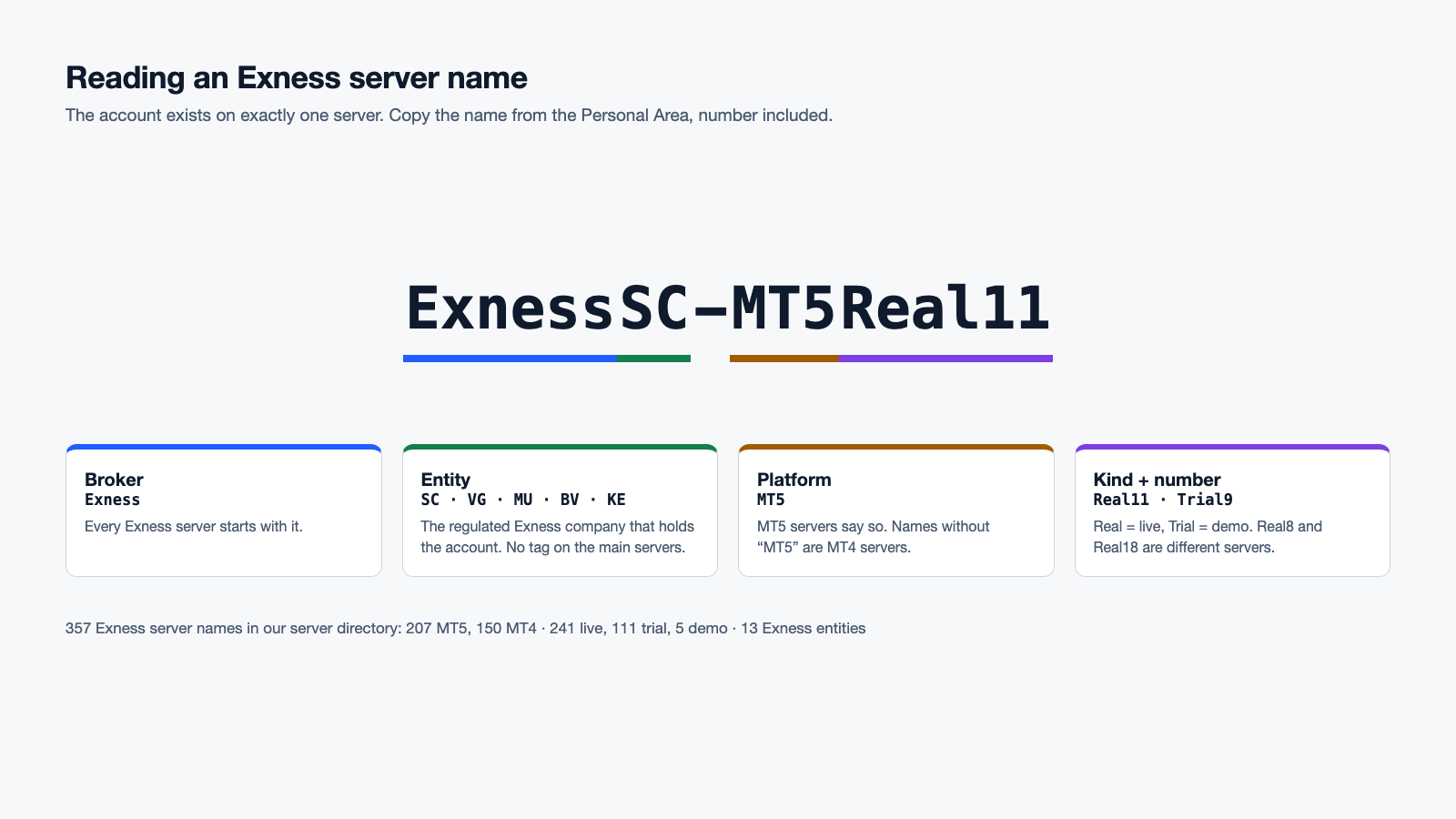
Exness server names, decoded
Exness runs many MetaTrader servers, split by regulated entity and by account kind. The name tells you both:
| Pattern | Meaning | Example |
|---|---|---|
Exness-MT5Real… |
Live MT5 server | Exness-MT5Real8 |
Exness-MT5Trial… |
Demo MT5 server (Exness calls demo accounts "trial") | Exness-MT5Trial9 |
ExnessSC-…, ExnessVG-…, ExnessMU-…, ExnessBV-…, ExnessKE-… |
Server of a specific Exness entity | ExnessSC-MT5Real11 |
ExnessLimitedJordan-…, ExnessJO-…, ExnessMenaFinancial-… |
Servers of the Jordan and MENA entities | ExnessMenaFinancial-MT5Real32 |
Exness-Real…, Exness-Trial… (no "MT5") |
Usually MT4 servers. A few MT5 servers also lack "MT5" (for example …-Demo and …-LP_Real1); the directory resolves the platform for you |
Exness-Real17 |
The number at the end matters. Exness-MT5Real8 and Exness-MT5Real18 are different servers, and an account exists on exactly one of them. A login sent to the wrong server is rejected exactly like a wrong password.
In our directory the 357 Exness names break down as 241 live (named Real or Live), 111 trial and 5 demo servers, belonging to 11 Exness legal entities.
Where the account holder finds the server name
In the Exness Personal Area, open My accounts, then the account's menu (⋮) and its account details. The server is listed next to the MT5 login. It is also in the welcome email Exness sends when an account is opened, and in the MT5 app under the account name.
Ask your users to copy it exactly. The most common onboarding failure we see is a server typed from memory, for example Exness-MT5Real without the number.
Connect an Exness account
curl -G "https://hrx.info/ConnectEx" \
  -H "x-api-key: YOUR_TENANT_KEY" \
  --data-urlencode "user=51234567" \
  --data-urlencode "password=ACCOUNT_PASSWORD" \
  --data-urlencode "server=Exness-MT5Real8"
For an MT4 account, add platform=MT4. The call waits up to 120 seconds for the account to connect (set wait= up to 180) and returns the account id and its own API key. A connection usually takes between 25 and 105 seconds; if it is still connecting when the wait ends, poll /ConnectState?id=…:
{
  "id": "6f1c0e2a-4c1d-4f8e-9a51-0d2e1b7c9f30",
  "status": "ACTIVE",
  "connected": true,
  "apiKey": "…",
  "platform": "MT5",
  "brokerServer": "Exness-MT5Real8"
}
If it fails, status is ERROR and statusReason explains the cause in one sentence, such as a wrong password or a server that did not answer. Credential errors are never retried automatically, so a wrong password does not trigger repeated failed logins on the Exness account.
Read the account
import httpx

API = "https://hrx.info"
KEY = "ACCOUNT_API_KEY"          # from ConnectEx
ACCOUNT = "6f1c0e2a-4c1d-4f8e-9a51-0d2e1b7c9f30"
h = {"x-api-key": KEY}

summary = httpx.get(f"{API}/AccountSummary", params={"id": ACCOUNT}, headers=h).json()
print(summary["balance"], summary["equity"], summary["profit"], summary["currency"])

positions = httpx.get(f"{API}/OpenedOrders", params={"id": ACCOUNT}, headers=h).json()
for p in positions:
    print(p["ticket"], p["symbol"], p["lots"], p["openPrice"], p["profit"])
profit in the account summary is the floating profit or loss of all open positions, in the account currency. For history, call OrderHistory?id=…&from=2026-09-01&to=2026-10-01; every closed trade includes commission, swap, profit and the magic number (expertId).
Exness symbol names: the suffix problem
Exness account types use different symbol names for the same instrument. Code that hard-codes XAUUSD works on one account and fails on the next. Names commonly seen on Exness accounts:
| Account type | Gold | Euro/dollar |
|---|---|---|
| Standard | XAUUSDm |
EURUSDm |
| Standard Cent | XAUUSDc |
EURUSDc |
| Pro, Raw Spread, Zero | XAUUSD |
EURUSD |
Treat this table as a hint, not a rule: Exness can change its naming and account line-up. Resolve the name per account from the account itself:
names = httpx.get(f"{API}/SymbolList", params={"id": ACCOUNT}, headers=h).json()
gold = next((n for n in names if n.upper().startswith("XAUUSD") and len(n) <= 7), None)
if gold is None:
    raise LookupError("no gold symbol on this account")

params = httpx.get(f"{API}/SymbolParams", params={"id": ACCOUNT, "symbol": gold}, headers=h).json()
info, group = params["symbolInfo"], params["symbolGroup"]
print(gold, info["contractSize"], group["minLots"], group["lotsStep"], info["digits"])
SymbolParams also returns the trade mode (symbolGroup.tradeMode, where 4 means fully tradable), the stops level, tick size and tick value. Cache the result per account and refresh it daily.
Cent accounts
Standard Cent accounts are denominated in cents: the account currency is a cent currency such as USC (US cents) or EUC (euro cents), and a USC balance of 10000 means 100 US dollars. Two consequences for your code:
- Convert before you aggregate. Adding a cent account's balance to a dollar account's balance overstates it 100 times. Read
currencyfrom the account summary and divide cent-currency amounts by 100. - Check the contract size before sizing orders. Volume on cent symbols is not comparable to standard symbols one to one, so size by exposure (lots × contract size), never by copying lots.
Trading on an Exness account
curl -G "https://hrx.info/OrderSend" \
  -H "x-api-key: ACCOUNT_API_KEY" \
  --data-urlencode "id=6f1c0e2a-4c1d-4f8e-9a51-0d2e1b7c9f30" \
  --data-urlencode "symbol=XAUUSDm" \
  --data-urlencode "operation=Buy" \
  --data-urlencode "volume=0.10" \
  --data-urlencode "stoploss=2638.50" \
  --data-urlencode "takeprofit=2671.00" \
  --data-urlencode "magic=456" \
  --data-urlencode "clientOrderId=APP-SIG456"
The response arrives after Exness has processed the order. state: 10009 means executed, and ticket identifies the position for later changes. The clientOrderId makes the request safe to retry: if the connection drops and you send it again within 24 hours, you get the original result back instead of a second position. If the first call timed out after it had reached Exness, the retry returns 409 IDEMPOTENCY_UNCERTAIN; check OpenedOrders for your magic number before sending a new order. Filling-mode mismatches (MT5 return code 10030) are retried with the other filling modes automatically.
Real-time events
wss://hrx.info/v1/stream?apiKey=ACCOUNT_API_KEY&id=ACCOUNT_ID
Without any subscription, the socket delivers every executed deal (TRADE), the open positions whenever they change (POSITIONS), pending orders whenever they change (ORDERS), and a HEARTBEAT every 10 seconds. Send {"action":"subscribe","symbol":"XAUUSDm"} to add live prices for a symbol. Use the account's own symbol name here as well.
Common Exness connection problems
| What you see | Cause | Fix |
|---|---|---|
| Login rejected, password is right | Wrong server number | Copy the server from Account information in the Personal Area |
| Login rejected after a password change | The account holder changed the password at Exness | Ask for the new password and reconnect the account |
Trade rejected with 10017 |
Trading is disabled for this account or symbol, for example an account connected with its investor (read-only) password | Connect with the master password if the account should trade |
| Symbol not found | Hard-coded name without the account's suffix | Resolve the name with SymbolList per account |
| Balance looks 100 times too large | Cent account (USC, EUC …) |
Divide by 100 before aggregating |
| A demo account will not connect | Server is a Trial server, typed as Real (or the reverse) |
Use the server from the account's details |
What it costs
Each connected Exness account uses one API seat. Seats are billed per 28-day period on a graduated scale: $14 for seats 1 to 4, $13 for seats 5 to 19 and $12 from seat 20. MT4 and MT5 cost the same. API requests, WebSocket streaming and trading volume are included, within the per-key rate limits.
Frequently asked questions
Does Exness allow API access to MT5 accounts? Exness does not offer a public trading API for retail MT5 accounts. A client-side API logs in to the account with its own credentials, the same way the MT5 app does. Whether a particular product is permitted is governed by the Exness client agreement and your local regulation.
Can I connect Exness demo accounts?
Yes. Exness demo accounts live on servers named …Trial… (a few entities use …-Demo), and they connect exactly like live accounts. They are the best way to build and test your integration.
Do MT4 Exness accounts work?
Yes. Connect with platform=MT4 and the MT4 server name. Use the endpoints shown on this page (AccountSummary, OpenedOrders, OrderHistory, OrderSend); they work the same on MT4 and MT5.
How many Exness accounts can I connect? Each account is one API seat on its own isolated connection. A new tenant starts with a seat limit that is raised on request; for hundreds or thousands of accounts, capacity is reserved before onboarding.
Is the password stored safely?
Passwords are encrypted with AES-256-GCM, never returned by the API and never logged. When an account is removed, its password is deleted permanently after a 7-day restore window. Your own system should keep only the account id and its API key.
Related guides
- Execute one trading signal on hundreds of MT5 accounts without duplicate orders
- MT5 Manager API alternative for multi-broker products
- How to get an MT5 API key
Create an account, open a free Exness demo, and connect it to see your account through the API in a few minutes.
Ready to integrate the MetaTrader API?
Set up in under 30 minutes. No terminal required.
Get Started →